That gut-punch feeling when a negative Facebook review pops up? Every contractor knows it. Your first instinct might be to just nuke it from your page, but it's not that simple.
You cannot directly delete a customer's review, no matter how much you disagree with it. Facebook’s system is set up to let you report reviews, but only if they break specific rules—their Community Standards.
The Hard Truth About Removing Facebook Reviews
For a busy contractor, an unfair review feels like a complete waste of time and energy. But here's the reality: Facebook isn't interested in playing referee in your customer service disputes.
Let's say a difficult client leaves a one-star review on a job you know was done perfectly. Frustrating, right? Unfortunately, that review almost certainly isn't going anywhere. Facebook's goal is to keep feedback transparent, even when it feels completely off base to you as the business owner.
Think of this process as policy enforcement, not a customer satisfaction hotline. Spending hours trying to report a review just because a customer was unhappy is a fast track to frustration. The smarter move is to get familiar with the very specific, very narrow criteria Facebook actually cares about.
What Actually Gets a Review Taken Down
Facebook will only step in and remove a review if it clearly crosses a line and violates their Community Standards. These aren't about disagreements over quality; they're about things that are flat-out unacceptable on the platform.
Here's a quick rundown of what they're looking for:
- Hate Speech or Harassment: The review uses slurs, makes personal attacks, or contains threats against you or your crew.
- Spam or Fake Content: It’s obviously from a bot, a competitor pretending to be a client, or someone who clearly never hired you.
- Totally Irrelevant Content: The review is just a political rant or some random comment that has zero to do with your business or services.
The key thing to remember is this: Facebook moderates how people say things, not what they say. A client can complain that your drywall work was shoddy, but they can't use discriminatory language or threaten you while doing it.
This flowchart breaks down the basic logic. If there's no clear policy violation, your only real move is to craft a solid public response.
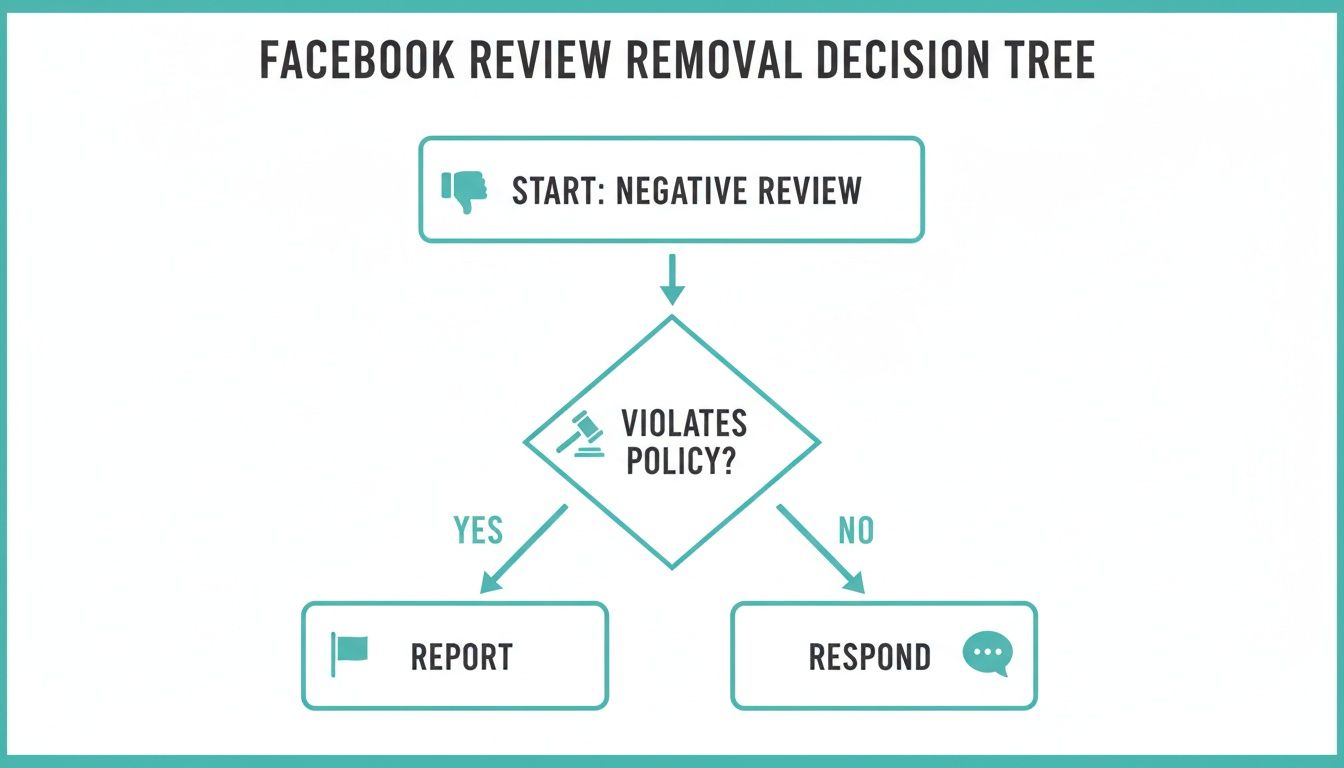
The takeaway is simple: the "report" button is for the really egregious stuff. Everything else falls into the "respond and manage" category.
To help you quickly size up a situation, here's a look at what Facebook will and won't consider.
Valid vs Invalid Reasons for Facebook Review Removal
| Violation Type (Will Be Considered for Removal) | Non-Violation Type (Will Be Ignored) |
|---|---|
| Contains threats, harassment, or hate speech. | Expresses disappointment with job quality. |
| Clearly posted by a competitor or fake profile. | Complains about your pricing or quotes. |
| Includes someone's private personal information. | Describes a negative customer service experience. |
| Is completely off-topic (e.g., political spam). | Disagrees with your professional opinion. |
| Promotes illegal services or products. | Details a misunderstanding about the project scope. |
This table should make it clear that most of the complaints you'll face—things like project delays, budget disagreements, or subjective critiques of your work—just aren't on Facebook's radar for removal.
On top of all this, getting a review removed is getting even tougher. After Meta made changes to its moderation, removals for violations like hateful content and bullying dropped by as much as 50% in early 2025. This shows that relying on Facebook to police your page is a losing game. It's a clear signal for contractors to get proactive with reputation management services that build a strong defense against the negative feedback you can't remove.
How to Properly Report a Violating Review
Alright, so even though the odds aren't always in our favor, if a review genuinely trashes Facebook's rules, you absolutely have to report it. It's about protecting your business. As a contractor, you don't have time to waste, so let's walk through exactly how to do this quickly and effectively to give your report the best shot at landing in front of a real person.
When a truly nasty or fake review pops up, the goal is to build a clear, factual case. You need to connect the dots for the moderator, showing them precisely how the review breaks a specific policy. No emotion, just facts.

Navigating the Reporting Process
First thing's first: find the review on your business Page. Look right next to the reviewer's name and you'll see three little dots (···). Give those a click.
A small menu will appear. You want to hit the option that says “Find support or report Recommendation.” This kicks off the reporting process and opens a new window where you have to tell Facebook what’s wrong. This is the single most important step—your selection here tells Facebook's automated system where to send your report first.
You’ll see a list of reasons. Here’s how to choose the right one:
- Spam: This is your go-to if the review is obvious bot activity, hawking some other product, or just a copy-paste review you've seen before.
- Hate Speech: Use this for any review that attacks someone based on race, religion, gender, or anything else in that vein. It's a serious violation.
- Harassment: If the review is just a personal attack, full of insults, or makes threats against you or your crew, this is the one.
- False Information: Be careful with this one. It’s for claims that are provably false—like saying you damaged their roof when you only worked on their basement—not just for opinions you don't like.
Pro Tip: Don't just say "this review is unfair." Get specific. Name the policy. Something like, "This review violates the Harassment policy by making a direct threat against my lead installer, John Doe," is infinitely more powerful.
A Simple Template for Your Report
When you get to the text box, keep it short and stick to the point. Ditch the emotion. You’re just trying to make it dead simple for a moderator to spot the violation and agree with you.
Here's a template I've used that works well. Just adapt it to your situation:
"This recommendation violates Facebook's Community Standards on [Insert Specific Violation, e.g., Spam]. The profile that left this review was created today and has zero other activity, strongly suggesting it is a fake account. The content is completely unrelated to our business or any service provided. We are requesting its immediate removal."
Getting the category right and writing a clear, concise justification is what gives your report a fighting chance. While the basic idea is the same on most sites, the details matter. For example, our guide on how to handle negative Yelp reviews breaks down strategies specific to their system, which is a different beast altogether.
Once you hit submit, the waiting game begins. You’ll usually hear back from Facebook within a few days.
What to Do When Facebook Rejects Your Report
So, you went through all the steps, carefully reported the review, and waited. A few days later, you get that dreaded, gut-punch of a notification: the review “doesn’t go against our Community Standards.” It’s an incredibly frustrating experience, but honestly, it's the most common outcome.
This isn't a personal attack. It's just how Meta, Facebook's parent company, operates. They take a hands-off, cautious approach to content moderation, especially when it comes to business disputes. Their automated systems are designed to err on the side of leaving content up unless it’s an absolutely clear-cut violation like hate speech or a direct threat.
Understanding Meta's Moderation Shift
Don't just take my word for it—Meta’s entire philosophy on this has shifted. In a recent policy update, the company boasted about a nearly 50% reduction in enforcement mistakes on its U.S. platforms from late 2024 to early 2025.
What does that really mean for a contractor like you? It means their systems are now far more conservative about removing anything. The odds of getting a borderline negative review taken down have dropped significantly. You can read more about Meta's more cautious approach to content moderation straight from their news blog.
This is a tough pill to swallow, but it’s a critical reality check. Pouring your time and energy into fighting an automated system over and over is a losing game.
The second you get that rejection notice from Facebook, it’s time to pivot. Stop trying to remove the review. Start focusing on controlling your reputation. You can't control their moderators, but you absolutely can control what people see when they look you up.
Taking Back Control of Your Reputation
This is where you stop playing defense and go on the offense. The strategy is simple but powerful: one negative review loses its sting when it’s drowned out by a dozen authentic, positive ones. It just becomes noise.
Instead of trying to erase a negative comment, your new mission is to bury it with an avalanche of positive proof. This pivot comes down to two main actions:
- Generate a flood of new, positive reviews: Get into the habit of proactively asking every happy customer for their feedback. This is your single most effective weapon.
- Build a stronger digital footprint: Start creating positive content about your business on other platforms. This ensures the bad review is just one small data point in a much bigger, overwhelmingly positive story.
This isn't about hiding from criticism. It's about making sure one disgruntled voice doesn't define the reputation you've worked so hard to build. The same principles apply across different platforms; you can learn more by checking out our guide on how to bury negative Google reviews. Remember, your reputation is built by the overwhelming majority of your great work, not the outlier.
Building a Reputation That Resists Negative Reviews
Let's be realistic: you can't count on Facebook's moderators to consistently have your back. So, instead of playing defense, it's time to build a digital fortress around your brand. A strong reputation strategy isn't about hiding from criticism—it's about making sure one negative comment becomes a tiny, insignificant blip on the radar.
The goal is to create such a powerful wave of positive proof that any single bad review looks like the rare exception it truly is. For contractors, this means shifting your focus from removal to construction. You're building an online presence that’s tough, resilient, and, most importantly, accurately reflects the quality of your work.
Your First Line of Defense: Authentic Reviews
The single best weapon against a negative review is a steady, incoming stream of positive ones. This isn't about getting a fake-looking flood of five-star ratings overnight. It’s about making the request for feedback a standard, non-negotiable part of your job-completion process.
Think about your last ten completed jobs. How many of those genuinely happy customers did you ask to share their experience online? If the answer is only one or two, you’re leaving your reputation exposed.
Here are a few simple, practical ways to get the ball rolling:
- The "Final Walkthrough" Ask: As you're doing the final walkthrough with a clearly satisfied client, that's your golden moment. It doesn't need to be a big sales pitch. Just say, "We're really glad you're happy with how everything turned out. It would mean the world to our team if you could share your experience on our Facebook Page."
- Simple Email Follow-Ups: A week after the job is done, send a quick follow-up email. Keep it brief and friendly, and—this is key—include a direct link straight to your Facebook Page's review section. Make it effortless for them.
- QR Codes on Invoices: Add a small QR code to your final invoice that takes customers directly to your review page. It’s a low-effort prompt that catches them while your business is still top of mind.
The key is consistency. Make asking for reviews an automatic step in your workflow, just like sending the final bill. One new positive review each week can completely transform your online reputation in just a few months, making the need to facebook remove reviews far less critical.
Beyond Facebook: Putting Your Positive Proof to Work
Once you start collecting great reviews, don't just let them gather dust on your Facebook Page. They are powerful assets that you've earned, and they should be working for you across your entire online presence. Think of each glowing review as a free piece of marketing content.
This strategy is about making sure that when people search for your business, they see positive, company-controlled results first. Let's face it, on platforms serving billions of users, most content stays up. According to Meta's own data, of the hundreds of billions of pieces of content on Facebook and Instagram, less than 1% was taken down for policy violations. For a contractor, that statistic proves that waiting around for platform removal is a losing game.
Here’s how to put your positive proof to work and control the narrative:
- Create a Website Testimonials Page: Build a dedicated page on your website to showcase your best reviews. Use the customer's name (with their permission, of course) and add photos of the finished project to give it real credibility.
- Turn Quotes into Social Media Graphics: Take the most powerful lines from your reviews and turn them into simple, branded graphics. Share them on your Facebook, Instagram, and even your LinkedIn profile to constantly reinforce the quality of your work.
- Write Case Studies and Project Spotlights: Go deeper than a simple review. Write a short blog post about a particularly successful project. Detail the client's initial problem, your solution, and use their positive feedback as the perfect conclusion.
By actively building and distributing all this positive content, you take back control. When a potential customer looks you up, they won’t get stuck on a single negative comment. Instead, they’ll find a mountain of evidence that proves you're the right contractor for the job.
Responding to Bad Reviews Without Making Things Worse
When a bad review pops up, your first gut reaction might be to get defensive. Fight it. How you respond to that negative feedback is often more telling to potential customers than the original complaint itself. A hot-headed, argumentative reply can confirm a prospect's worst fears, but a calm, professional one can actually win them over.
Think about it from a potential client's perspective. They see a one-star review and immediately scroll down to see how you handled it. Did you get into a public shouting match, or did you handle the situation with grace? Your response is a live demonstration of your customer service skills under pressure.
The best strategy is always to de-escalate the conflict in public and immediately move the conversation to a private channel. This simple move shows everyone watching that you're proactive and serious about customer satisfaction, all without airing out the nitty-gritty details for the world to see.
Crafting the Perfect Public Response
Keep your public reply short, professional, and empathetic. This is not the place to litigate the project, dispute the facts, or defend your crew’s honor. The sole purpose of this public comment is to acknowledge the customer’s frustration and provide a path to resolve it offline.
Here’s a simple, field-tested template that works nearly every time:
"Hi [Customer Name], thank you for bringing this to our attention. We're sorry to hear that your experience wasn't what you expected. We take feedback like this very seriously and want to understand what happened. Please give us a call at [Your Phone Number] or email me directly at [Your Email] so we can make this right."
This approach hits all the right notes:
- It validates their feelings. Simple phrases like "we're sorry to hear" go a long way in showing you're listening.
- It makes you look professional. You’re not getting dragged into a messy public argument.
- It gives a clear call to action. You’ve provided a direct, private line for them to get a real resolution.
This formula is your go-to whether the complaint is completely valid or totally off-base. Remember, your audience isn't just the unhappy customer; it's every future customer who will read that review. You're showing them that even when things go wrong, you handle it like a pro.
Effective vs Ineffective Responses to Negative Reviews
To really drive the point home, let's look at what separates a response that salvages your reputation from one that just pours gasoline on the fire. Mastering this is often more impactful than any attempt to facebook remove reviews.
| Response Strategy Do This | Response Mistake Avoid This |
|---|---|
| Acknowledge the customer's concern promptly. | Ignore the review and hope it disappears. |
| Offer to take the conversation offline. | Argue about project details in public replies. |
| Keep the public response brief and professional. | Write a long, emotional, and defensive paragraph. |
| Apologize for their negative experience. | Blame the customer or make excuses for the issue. |
| Focus on a solution, not on winning the argument. | Offer discounts or freebies in the public reply. |
At the end of the day, a single, thoughtfully crafted response can completely neutralize the damage from a negative review. More than that, it builds trust and shows future clients that you stand behind your work and value every customer—even the ones who are hard to please.
Your Top Questions About Facebook Reviews, Answered
Let's cut right to the chase. When you're dealing with a bad review, you need clear, direct answers. Here are the most common questions I hear from contractors about handling their Facebook reputation, with practical advice you can use immediately.

Can I Just Delete a Bad Review Myself?
The short answer is no. You, as the page owner, can't just click a button and delete a review someone else left on your business page. Facebook built its platform for transparency, so only the person who wrote the review or Facebook's own moderators have the power to take it down.
Your two moves are to either report it for violating their policies or respond to it publicly. Understanding this upfront will save you a ton of frustration looking for a delete button that simply isn't there.
How Long Does Facebook Take to Review a Report?
Once you've reported a review, it's a waiting game. You'll usually hear back within a few days to a week, but that timeline is far from guaranteed.
Don't be shocked if you get an almost instant, automated rejection. If your case is more complex and needs a real person to look at it, it’s naturally going to take longer. Unfortunately, there's no set timeline, and spamming the report button won't make them move any faster.
What If I Suspect a Competitor Left a Fake Review?
It’s one of the most frustrating things to deal with—a fake review from a competitor. If you have a strong suspicion, your best bet is to report it as Spam or False Information.
Be specific and stick to the facts in your report. State clearly that you have no client record of this individual. Point out anything that looks fishy, like if the profile was created yesterday and has zero friends or activity. It's not a surefire win, but giving Facebook that context makes it much harder for them to ignore.
Is Turning Off All Reviews a Good Idea?
Think of this as the nuclear option. While disabling the "Reviews" or "Recommendations" tab does hide everything—the good, the bad, and the ugly—it also shuts the door on all future happy customers who want to sing your praises.
This is a move you should only consider if you're facing a coordinated, malicious attack of fake reviews. For the vast majority of contractors, the value of having authentic, positive feedback on display is worth much more than the sting of one or two negative comments. It’s almost always better to drown out the negative with a flood of positives than to go completely silent.
Tired of losing jobs over unfair reviews you can't get removed? Impruview creates a powerful online presence for contractors that pushes negative search results down and puts your best work front and center. Take back control of your reputation at https://www.impruview.com.