If you're a contractor, getting more Google reviews boils down to one simple truth: you have to make it ridiculously easy for happy customers to leave you one. The secret is asking at the perfect moment—right when the job is done and they’re thrilled with your work—and removing every single roadblock from the process.
Why Google Reviews Are Your Best Salesperson

We've all been there. You do a dozen fantastic jobs, but one unfair review pops up and it feels like it erases all that hard work. But what if you could build such a strong reputation that those rare negative comments barely make a dent?
For any roofer, plumber, or HVAC pro, mastering your Google reviews is the single most powerful marketing move you can make. This isn't about chasing vanity metrics. It’s about building a bulletproof online presence that brings in high-quality leads on autopilot.
The New Word-of-Mouth
Think of your Google Business Profile as the digital version of a firm handshake and a referral from a trusted neighbor. The psychology here is incredibly powerful. For a potential customer, your star rating and the comments from past clients are often the first—and sometimes only—impression they get of your business.
The data on this is staggering. As of 2026, 91% of consumers read online reviews before making a decision. Even more telling, 88% of shoppers trust those reviews as much as a personal recommendation from a friend. Compare that to social media, where only 41% feel the same way about branded content.
This is a game-changer. For contractors tired of fighting off bad Yelp reviews, focusing on your Google profile isn't just a good idea—it's a critical lifeline for survival and growth.
Impact Of Google Reviews Versus Other Channels
It can be tough to decide where to put your marketing dollars. This table breaks down why a solid Google Review strategy often delivers the best bang for your buck compared to other channels you might be considering.
| Channel | Consumer Trust Level | Impact On Conversion | Relevance For Local Contractors |
|---|---|---|---|
| Google Reviews | Very High | Directly drives calls & bookings | Extremely High (first-look for local services) |
| Paid Social Ads | Low | Varies (often for brand awareness) | Medium (good for targeting, but lacks immediate trust) |
| Direct Mail | Medium | Low (often discarded) | High (can work, but expensive and hard to track ROI) |
| Local TV/Radio | Medium-Low | Low (brand awareness, not direct action) | Medium (very expensive, broad reach) |
As you can see, Google Reviews hit the sweet spot of high trust and direct impact on your bottom line, making it an incredibly efficient focus for any local service business.
Turning Stars Into Signed Contracts
A high star rating isn't just for show; it directly translates into more signed jobs. It’s the clearest signal of trust you can send, instantly setting you apart from a sea of competitors in your local market.
This isn’t just a theory. The numbers back it up:
- Better Conversion Rates: We see businesses with 4.5+ star ratings convert browsers into booked jobs at a 28% higher rate than their lower-rated competitors.
- Higher Quality Leads: When a homeowner finds you through a mountain of positive reviews, they're already sold on your quality. This means smoother sales calls and fewer price objections.
- Boosted Local SEO: A steady stream of fresh, positive reviews is a huge ranking signal for Google's local map pack. More reviews mean more visibility when customers search for services in your town.
At the end of the day, a strong review profile is a fundamental asset. It's a key piece of many effective small business growth strategies because it drives real revenue and builds a brand people trust. This guide will walk you through exactly how to build that asset, step by step.
Before you even ask a single customer for a review, you need to make sure your own house is in order. Think of your Google Business Profile as your digital storefront. If it looks sloppy or deserted, even the most heartfelt review request is going to fall flat.
Turning a bare-bones profile into a machine that pulls in great reviews isn't just about filling in a few fields. It's about strategically setting it up to build instant trust, making a homeowner feel like they've already found the right pro for the job.
Nail Your Core Information
First, let's cover the absolute must-haves. Every single field needs to be filled out, and it all has to be 100% accurate. This sounds like a no-brainer, but you’d be surprised how many contractors leave money on the table with a messy profile.
Consistency is everything here. Your name, address, and phone number (NAP) have to be a perfect match everywhere they appear online. An old address or a wrong phone number is a huge red flag for potential customers—and for Google's algorithm.
Think of your GBP as the foundation of your online reputation. A crack in this foundation, like an incorrect phone number, can compromise your entire lead generation strategy.
Choose The Right Categories And Services
Google’s categories are not the place to be vague. If you're an HVAC contractor, your primary category needs to be exactly that: "HVAC contractor."
But don't stop there. This is where you can really zero in on your ideal customers. Add secondary categories like "Air conditioning repair service" or "Heating contractor." Then, go into the Services section and list out every single thing you do. I'm talking "furnace tune-up," "ductwork installation," "emergency plumbing repair"—get specific.
This level of detail is what helps Google connect you with a homeowner searching for the exact service you provide. To see just how much this impacts your ranking, check out our deep dive into local SEO for contractors.
Bring Your Profile To Life With Photos
Photos are your not-so-secret weapon for standing out. A profile with good images gets 42% more requests for driving directions and 35% more clicks through to its website. That's a massive advantage.
Forget just uploading your logo and calling it a day. You need to show people the quality work you do.
- Geotagged Photos of Your Work: Always snap high-quality before-and-after photos of your best projects. Before you upload them, use a free online tool to add geotags (GPS data). This is a powerful local signal that tells Google you’re actually working in the areas you serve.
- Pictures of Your Team and Vehicles: Show off your clean, branded trucks and your professional, uniformed techs. This builds trust and makes your business look established.
- Yourself at the Office or on a Job Site: A shot of the owner on-site or with the team adds a human touch. It makes your business feel more authentic and less like a faceless corporation.
Write A Description That Solves A Problem
That 750-character business description is your sales pitch, not a spot for corporate buzzwords. You need to speak directly to your customer’s problems and show them why you're the one to solve them.
Instead of writing this: "We are a full-service plumbing company dedicated to excellence."
Try something like this: "Tired of that leaky faucet or clogged drain? We're your local plumbing experts in [Your City], delivering fast and reliable solutions you can count on. From emergency repairs to full bathroom remodels, we guarantee our work."
See the difference? The second one is relatable and compelling. The whole point is to build a foundation of positive experiences, from the very first click to the final invoice. It's all about implementing solid customer success best practices so every interaction reinforces the quality and professionalism people see on your profile.
Getting great work done is only half the battle. If you're not turning those happy clients into powerful Google reviews, you're leaving a massive asset on the table. The trick isn't just about asking; it's about making the ask at the perfect moment, through the right channel, so it feels like a natural high-five instead of an awkward chore.
Timing is everything. You want to catch the client right at their "moment of maximum happiness." This is that peak of relief and satisfaction when the job is officially done and looks fantastic.
For a contractor, this moment is pure gold. It's when the homeowner feels that first wave of cool air from the new AC unit you just installed. It’s when they see their stunning new kitchen remodel, fully finished. Or it's the quiet confidence they feel looking at their new roof, knowing the big storm in the forecast is no longer a threat. That’s your window.
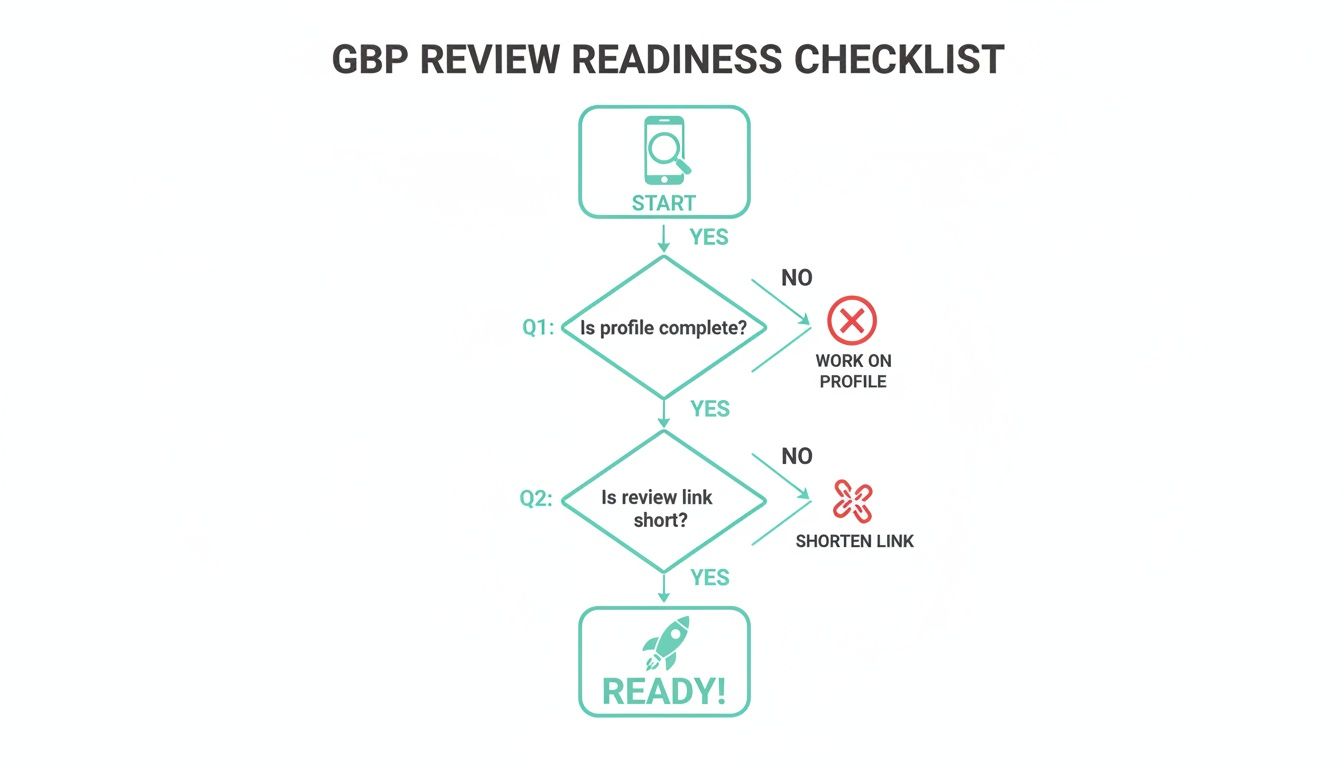
Before you even think about asking, you need a solid foundation. This simple flowchart walks you through getting your Google Business Profile ready. A complete profile and a short, direct review link are non-negotiable first steps.
Choosing Your Channel: SMS, Email, or In-Person?
Once you've got the timing down, you need to decide how you're going to ask. Think of these as different tools in your toolbox—the best one depends on the job, your relationship with the client, and what feels most natural.
Choosing the right channel is crucial for maximizing your response rate. Different methods work better for different types of jobs and customer interactions. Here’s a quick breakdown of the most common channels we see contractors using successfully.
Comparing Review Request Channels For Contractors
| Channel | Typical Response Rate | Best For | Pro Tip |
|---|---|---|---|
| SMS (Text Message) | Up to 98% open rate | Quick service calls (e.g., HVAC tune-up, plumbing fix) where the interaction is fast and transactional. | Automate the text to send shortly after the job is marked complete. Keep the message short and friendly. |
| Varies (10-25%) | Larger, multi-day projects (e.g., roofing, remodels) where you've built a stronger rapport with the client. | Personalize the email. Reference a specific detail about the project to show you remember and care. | |
| On-Site QR Codes | Varies (highly effective) | Any job where your tech interacts with the customer on-site, especially emergency services. | Provide techs with professional-looking leave-behinds (cards, door hangers) that include the QR code. |
Each channel has its place. SMS is for speed, email is for personalization, and QR codes are for capturing that in-the-moment satisfaction.
Pro Tip: A word of caution on QR codes. Never have a customer leave a review while connected to your office or a company hotspot. Multiple reviews from the same IP address can look suspicious to Google's algorithm and might get filtered out as spam. Make sure they use their own phone's cellular data.
How This Looks In The Real World
Theory is great, but let's talk about what this actually looks like on a Tuesday afternoon. Here are a few common scenarios and how to handle the ask.
Scenario 1: The AC Tune-Up (Using SMS)
Your technician just finished a routine AC service. The homeowner is happy and signs off on the invoice. Right as your tech drives away, an automated text message hits the client's phone: "Hi [Client Name], this is [Your Name] from [Company]. So glad we could get your AC running smoothly for the summer! If you have 30 seconds, your feedback on Google would mean the world. Thanks!" The message includes your direct review link. It’s fast, frictionless, and incredibly effective.
Scenario 2: The Roof Replacement (Using Email)
You've just wrapped up a week-long roofing project. You've been in regular contact with the homeowner, building trust along the way. The day after your crew does the final cleanup, send a personal email. You can say something like, "Hope you're loving the look of your new architectural shingle roof!" Thank them sincerely for their business, then explain how much a review from them helps other local homeowners find you.
Scenario 3: The Late-Night Plumbing Leak (Using a QR Code)
It's 10 PM, and your plumber just saved the day by fixing a burst pipe. The homeowner is beyond relieved. After the payment is processed, your plumber hands them a simple, branded card. On it, a message: "Glad we could help! Your feedback helps other local families find us in an emergency." Below the text is a big, scannable QR code that goes straight to your Google review page. This is the perfect way to capture that powerful feeling of gratitude.
If you want to dive even deeper into the specific words and phrases that work best, we've got a whole separate guide on how to ask customers for testimonials that you might find helpful.
Make Your QR Codes Impossible To Mess Up
QR codes are fantastic, but a clunky experience will kill your conversion rate. The goal is zero friction. The customer should scan the code and be instantly ready to leave a review.
First, you need to grab your direct Google review link. Then, pop that link into a free online QR code generator. The most important step? Test it. Test it on an iPhone. Test it on an Android. Make sure it goes directly to the pop-up window where they can tap the stars and start typing. Don't just link to your profile and make them hunt for the review button—almost nobody will follow through.
By getting your timing right and picking the right channel for the job, you’ll stop hoping for reviews and start systematically generating them. It just needs to be a seamless part of your customer service process.
Field-Tested Scripts And Templates That Convert
So you’ve got the timing down and you know the best way to reach your customer. The final, and most important, piece of the puzzle is what you actually say. A clunky, generic message is just going to get ignored, but a personal, well-worded request can make all the difference.
What you'll find below are scripts our team has seen work time and time again for hundreds of contractors. These aren't just placeholders; they're designed from the ground up to feel personal and prompt the kind of detailed feedback that truly helps your business. The idea is to make leaving a review feel less like a chore and more like a simple way for a happy customer to say thanks.
The Friendly SMS For Quick Jobs
Let's talk about those smaller, in-and-out jobs—a quick plumbing fix, an annual HVAC tune-up. A text message is your best friend here. SMS has an almost unbelievable open rate (up to 98%), so you know your message is getting seen. The trick is to keep it short, friendly, and direct.
This works because it lands right in that moment of satisfaction, feeling immediate and personal.
The Go-To SMS Script:
"Hi [Client Name], it's [Your Name] from [Company Name]. So glad we could get your furnace fixed up and running for the winter! If you have 30 seconds, your feedback on Google would mean the world to our small team. Thanks! [Direct Google Review Link]"
What makes this so effective? It's personal, it mentions the specific job ("furnace fix"), and it frames the request as a tiny ask—just "30 seconds" of their time. It's a low-friction way to get a high-value review.
The Detailed Email For Major Projects
When you wrap up a big project like a full kitchen remodel or a roof replacement, a simple text just doesn't feel right. You’ve spent days, maybe weeks, building a relationship with that client. An email gives you the space to be more thoughtful and reinforce the value you delivered.
This is your chance to show genuine appreciation and remind them of the great work your crew put in. Don't be afraid to let your personality shine through.
Our Proven Email Script:
Subject: How's the new roof treating you?
"Hi [Client Name],
Hope you're enjoying the look of your new GAF Timberline roof! The crew and I were really proud of how it turned out.
Thank you again for trusting us with your home. We're a local business, and reviews from great customers like you are how we grow and help other homeowners in [Your City] find us.
If you have a minute, could you share your experience on Google? It would be a huge help.
[Direct Google Review Link]
All the best,
[Your Name] & The [Company Name] Team"
This script just plain works. Why? Because it's warm and specific. Mentioning the exact shingle type ("GAF Timberline") shows you remember the details of their project. It feels less like an automated blast and more like a genuine follow-up from a contractor who actually cares.
The On-Site "Leave-Behind" With A QR Code
Here’s a real game-changer: empower your techs to get reviews right on the job site. A simple, well-designed "leave-behind" card or door hanger with a QR code is the perfect tool. It captures that "moment of maximum happiness" before the feeling fades.
This tactic is pure gold for emergency services. Think about it: your plumber just fixed a burst pipe at 10 PM. The customer's relief is off the charts. Handing them a card at that exact moment is incredibly effective.
Tips for a Great Leave-Behind Card:
- Clean Design: Stick to your logo and brand colors. Don't overcomplicate it.
- Big QR Code: It needs to be the star of the show. Make it large and easy to scan.
- Actionable Text: Keep the wording simple and direct.
- Headline: "Glad we could help!" or "How did we do?"
- Body: "Your feedback helps other local families find us in an emergency. Scan the code to share your experience on Google!"
The goal here isn't just to get more Google reviews; it's to build a system. By making your requests personal, specific, and incredibly simple, you'll see your happy customers transform into your most powerful marketing team.
No matter how great your service is, if you’re actively asking for reviews, you’re eventually going to get a bad one. It just comes with the territory. The real test isn’t avoiding criticism—it’s how you handle it when it lands on your profile.
Getting it right can actually be a marketing win. A thoughtful response shows potential customers that you’re a professional who stands behind your work. Let’s walk through the playbook for managing tough feedback and, just as crucial, staying on Google’s good side.
The Right Way to Handle Negative Reviews
When that one-star notification hits your inbox, your gut reaction might be to fight back or just ignore it and hope it goes away. Both are mistakes. Remember, your response isn't just for the unhappy customer; it's for every single prospect who will read that review later.
Here’s a simple process that works every time.
- Acknowledge and Apologize. You have to start here. Thank them for the feedback and say you're sorry their experience wasn’t what it should have been. This isn't about admitting fault—it's about validating their frustration.
- Keep Your Side Brief (If Necessary). If there's a simple misunderstanding, you can gently clarify it. But this is not the place to get into a "he said, she said" debate. Stay professional and stick to the facts.
- Take It Offline. This is the most important step. Give them a direct phone number or email to resolve the issue privately. It shows you’re committed to a solution, not a public argument.
Let’s look at a real-world example for a plumbing company.
The Wrong Way: "We did the job you approved and have photos to prove it. This is totally unfair."
The Right Way: "We're genuinely sorry to hear your experience didn't meet expectations. Our goal is 100% satisfaction, and we'd appreciate the chance to make things right. Please call our owner, John, directly at [phone number] so we can figure out what happened."
See the difference? The second response immediately de-escalates the tension and moves the conversation out of the public spotlight. For more scripts and a deeper dive, check out our guide on how to respond to a negative Google review.
Staying Compliant With Google's Rules
While you’re chasing reviews, you have to be careful not to break Google’s rules. They have very strict policies designed to keep reviews authentic, and getting on their bad side can lead to deleted reviews or even a suspended profile.
There are two massive violations you absolutely must avoid.
Review Gating
This is when you try to pre-screen your customers. For example, you send an internal survey and only ask the happy ones to leave a Google review, while unhappy customers are funneled to a private feedback form. This is a huge no-no. Google's policy is clear: you have to give every customer the same, equal opportunity to leave a public review.
Incentivizing Reviews
You can't offer anything in exchange for a review. No gift cards, no discounts, no "freebie for your feedback." This applies to both positive and negative reviews. The review has to be given freely, without any strings attached.
Don't even think about bending these rules. Google's algorithm is smarter than you think and is excellent at sniffing out these tactics. The penalties are harsh, and it's just not worth the risk.
Your Best Defense Is a Good Offense
So, how do you protect your star rating from that occasional bad review without breaking the rules? The answer is surprisingly simple: get a constant, steady stream of authentic, positive reviews.
When you’re consistently bringing in new feedback from happy customers, a single one-star comment loses its power. It becomes a small blip on an otherwise fantastic track record instead of a giant red flag.
This is more critical than ever. For contractors in the home services world—from roofers fixing storm damage to electricians wiring a new build—Google is aggressively purging legitimate reviews. It's estimated that 5-15% of all reviews are eventually removed, with contractors getting hit especially hard. The algorithm often flags glowing five-star feedback, leaving good businesses with a thinned-out profile overnight.
This is why having a deep bench of reviews is so important. A consistent flow of new feedback does two things:
- It buries the bad stuff. New, positive reviews naturally push older, negative ones down the page where fewer people will see them.
- It protects you from purges. If Google’s algorithm zaps a few of your five-star reviews, having plenty of others in the bank ensures your overall rating stays strong.
Ultimately, reputation management isn't about damage control. It’s about building a review generation machine so strong that it insulates your business from the inevitable bumps in the road.
Questions We Hear All The Time From Contractors
Look, even with the best system in place, you’re going to have questions. Getting a steady stream of Google reviews is a process, and you’ll hit a few bumps. After helping hundreds of contractors, I've found the same questions pop up again and again. Here are the answers you need to hear.
How Many Google Reviews Do I Actually Need?
This is always the first question, and my answer surprises people. It’s not about hitting some magic number. It's about momentum and recency.
Think about it from a homeowner's perspective. What’s more convincing? A company with 200 reviews, but the last one was six months ago? Or a company with 100 reviews, but five of them came in last week? The recent activity always wins.
In fact, research shows that a staggering 73% of consumers only care about reviews written in the last month. Your goal isn’t a final number; it’s building a predictable flow of fresh feedback.
- Shoot for Consistency: A solid target to start with is 5-10 new reviews every single month. This signals to both Google and potential customers that you're active, busy, and consistently doing great work.
- Outpace Your Local Competitors: The real magic happens when you have more reviews and more recent reviews than the other guys in your area. That’s when you’ll see your ranking climb and your lead quality skyrocket.
Having a high total count is nice, but having a constant drip of new, positive feedback is what truly moves the needle.
Can I Offer a Discount for a Google Review?
Let me be blunt: absolutely not. This is one of the brightest red lines you can cross with Google. Offering any kind of incentive—a discount, a gift card, a free add-on—in exchange for a review is a direct violation of their terms of service.
Google has a name for this: review gating. And they take it very seriously.
Don't ever be tempted to say, "Get a $25 gift card for your feedback on Google." Their algorithm is incredibly smart and can easily spot patterns of incentivized reviews. The fallout can be brutal, from having all your hard-earned reviews wiped out to getting your entire Google Business Profile suspended.
Just earn it. Pour your energy into giving people a five-star experience and then make it ridiculously easy for them to talk about it.
What Do I Do About an Unfair Negative Review?
It’s one of the most frustrating things that can happen to a business owner. But it will happen. The most important thing to get right is this: your public response is not for the person who wrote the review; it’s for every single future customer who will read it.
So, take a breath and respond publicly, professionally, and quickly.
Here’s a simple framework that works:
- Acknowledge Their Frustration. Start by thanking them for the feedback and showing empathy. "We're sorry to hear your experience didn't meet your expectations." This immediately de-escalates the situation and shows you're listening.
- State Your Side (Briefly and Without Emotion). Don't get into a public argument. If there's a crucial fact to clarify, do it calmly. For instance: "Our records show the project was completed to the agreed-upon specs and passed the final inspection on Tuesday."
- Take It Offline. This is the critical step. Give them a clear path to resolve it privately. "We want to make this right. Please call me directly at the office so we can discuss this further. Ask for [Your Name] at [Your Number]."
This approach shows potential customers that you’re a professional who takes responsibility and solves problems. That message is often more powerful than the negative review itself.
Should I Ask All My Past Customers for Reviews at Once?
I see contractors want to do this all the time—blast an email to everyone they've worked with for the past three years. It feels productive, but it’s almost always a waste of time. The "moment of maximum happiness" is long gone, and the request just feels random and impersonal.
The odds of someone leaving a review drop like a rock with every day that passes after the job is done.
Your best bet is to focus your energy where it counts.
- Hit Up Recent Customers First. The sweet spot is within 24-48 hours of project completion. The amazing job you did is still fresh in their mind, and they're far more likely to take two minutes to help you out.
- Get Personal with Older Clients. If you must reach out to past customers, don't send a generic blast. Craft a personal note. Remind them of the work you did ("Hey John, hope you're still loving that deck we built for you last spring!") before you even think about asking.
- Know the Rules. Be extremely careful with mass texts. To comply with the TCPA (Telephone Consumer Protection Act), you need explicit consent from every single person before you send them a marketing message, which includes a review request.
Stick to your most recent happy customers. That’s how you build the steady momentum that will help you own your local market.
If unfair reviews on Google or Yelp are hurting your business, Impruview can help. We specialize in pushing down negative search results and building a powerful, positive online presence for contractors. Stop losing leads and take control of your reputation.
Learn more about how Impruview can restore your brand's image.